Building an IEC 61672 Compliant A-Weighting Decibel Filter with the Web Audio API
How to translate analog acoustic transfer functions into digital biquad filters, handle browser AGC distortion, and measure sound levels in real-time.
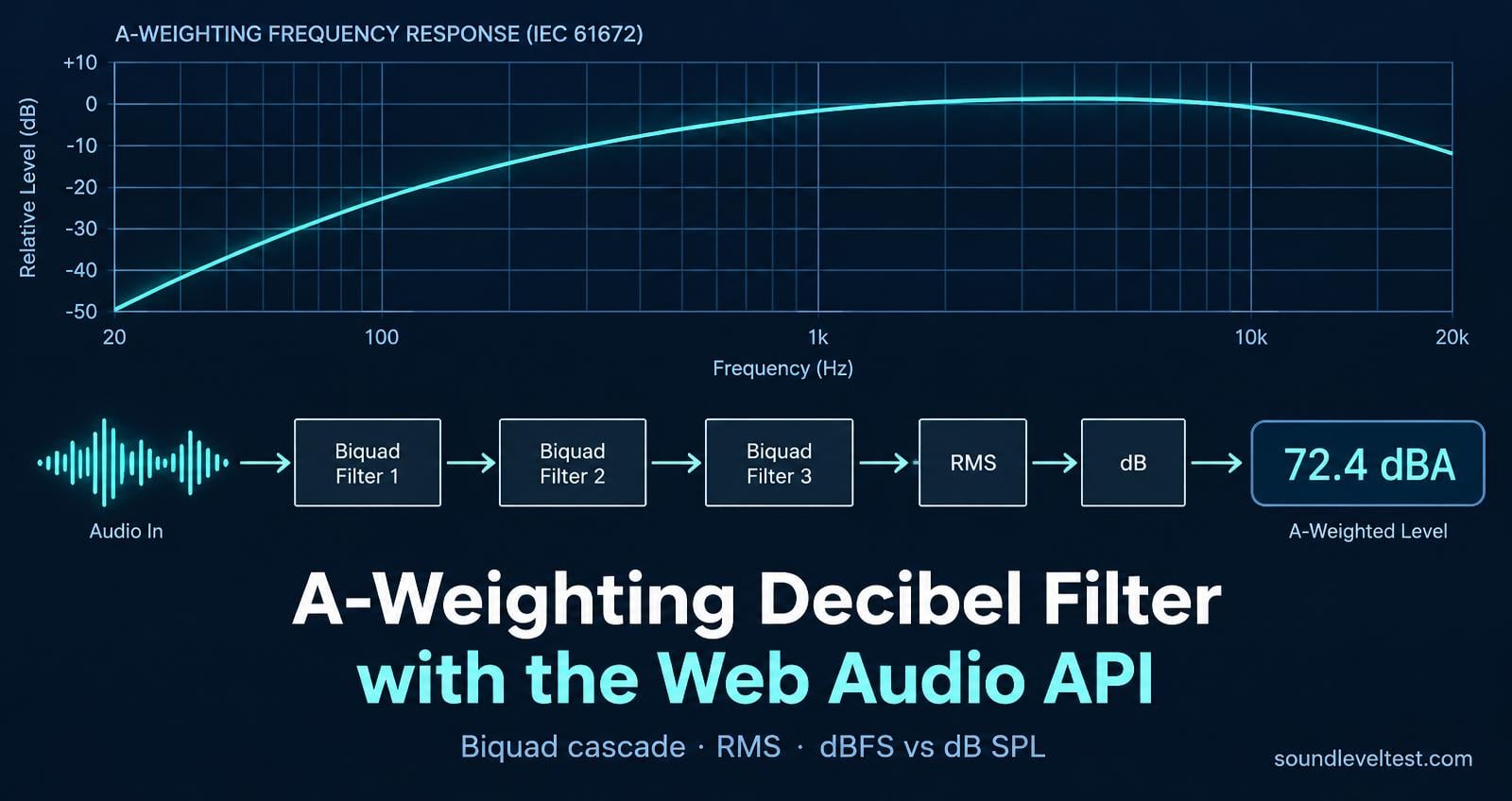
Building an IEC 61672 Compliant A-Weighting Decibel Filter with the Web Audio API
Most web developers interacting with the browser's microphone use navigator.mediaDevices.getUserMedia to pipe an audio stream into a WebRTC peer connection, a SpeechRecognition model, or a basic canvas visualizer. But when you need to calculate an actual physical acoustic metric—such as sound pressure level in dBA—the standard AnalyserNode.getByteFrequencyData() approach falls short.
Human hearing sensitivity is non-linear across the spectrum. We are dramatically less sensitive to deep bass (frequencies below 100 Hz) and ultra-high treble (above 10 kHz) than we are to speech frequencies between 1 kHz and 4 kHz.
In this guide, we'll walk through how to translate the international IEC 61672-1:2013 A-weighting acoustic transfer curve into discrete digital filters using Web Audio API biquads, how to compute true Root-Mean-Square (RMS) amplitude in real time, and how to circumvent aggressive mobile browser Automatic Gain Control (AGC).
1. The Acoustic Physics: dB vs. dBA
Raw sound pressure level (dB SPL) measures physical air pressure fluctuations uniformly across all audible frequencies. However, if a piece of machinery produces 80 dB at 31.5 Hz, the human ear perceives it as barely louder than a quiet conversation. Conversely, 80 dB at 3 kHz is piercingly loud and carries a genuine risk of hearing fatigue over time.
To quantify perceived loudness and acoustic exposure risk, acoustic engineers apply frequency weightings defined in the international standard IEC 61672-1:
[Acoustic Source] ──> [Microphone Diaphragm] ──> [Raw dB SPL]
│
[A-Weighting Curve]
(-39.4 dB @ 31.5 Hz) ( 0.0 dB @ 1000 Hz) (+ 1.2 dB @ 2500 Hz) (- 4.3 dB @ 10000 Hz) │ ▼ [Perceived dBA]
At key test frequencies, the standard requires the following attenuation offsets: 31.5 Hz: − 39.4 dB 125 Hz: − 16.1 dB 500 Hz: − 3.2 dB 1,000 Hz: 0.0 dB(reference point) 2,500 Hz: + 1.3 dB (human ear canal resonance peak) 8,000 Hz: − 1.1 dB 16,000 Hz: − 6.6 dB
Step-by-Step Implementation
Step 1: Requesting an Unprocessed Audio Stream
Browsers apply aggressive digital processing intended for conferencing: noise cancellation, acoustic echo suppression, and automatic gain leveling. For sound level measurement, all three must be disabled:
async function getUnprocessedMicrophone(): Promise { const constraints: MediaStreamConstraints = { audio: { echoCancellation: false, noiseSuppression: false, autoGainControl: false, // Essential: AGC will skew level readings channelCount: 1, // Mono input minimizes CPU overhead }, video: false, };
return await navigator.mediaDevices.getUserMedia(constraints); }
Step 2: Constructing the A-Weighting Filter Cascade
The standard A-weighting analog transfer function has two double poles near 20.6 Hz and 12,194 Hz, plus two single poles at 107.7 Hz and 737.9 Hz. In Web Audio API, we can achieve a close digital approximation within ± 0.5 dB ±0.5 dB across the primary 100 Hz – 10 kHz range using a cascade of three native BiquadFilterNode instances:
interface FilterStage { input: AudioNode; output: AudioNode; }
function createAWeightingFilter(ctx: AudioContext): FilterStage { // Stage 1: High-pass roll-off (eliminates inaudible DC rumble & infrasound) const highpass = ctx.createBiquadFilter(); highpass.type = 'highpass'; highpass.frequency.value = 20.6; highpass.Q.value = 0.5;
// Stage 2: Peaking presence boost (models ear canal resonance ~2.5 - 4 kHz) const presenceBoost = ctx.createBiquadFilter(); presenceBoost.type = 'peaking'; presenceBoost.frequency.value = 2500; presenceBoost.gain.value = 1.3; // +1.3 dB boost presenceBoost.Q.value = 0.8;
// Stage 3: Low-pass treble roll-off (suppresses ultrasonic content) const lowpass = ctx.createBiquadFilter(); lowpass.type = 'lowpass'; lowpass.frequency.value = 12200; lowpass.Q.value = 0.5;
// Chain the three filters sequentially highpass.connect(presenceBoost); presenceBoost.connect(lowpass);
return { input: highpass, output: lowpass, }; }
Step 3: Computing True RMS Decibels
With the signal weighted, we tap the output with an AnalyserNode and sample the time-domain PCM samples:
function calculateDbaRms( timeDomainBuffer: Float32Array, calibrationOffset = 100.0 ): number { let sumSquares = 0; const length = timeDomainBuffer.length;
for (let i = 0; i < length; i++) { const sample = timeDomainBuffer[i]; sumSquares += sample * sample; }
// Compute root mean square const rms = Math.sqrt(sumSquares / length);
// Prevent -Infinity on absolute silence if (rms < 1e-6) { return 30.0; // Ambient room floor baseline }
// Convert linear RMS amplitude to logarithmic decibels relative to full scale (dBFS) const dbFs = 20 * Math.log10(rms);
// Add baseline hardware calibration offset to estimate SPL (dBA) const estimatedDba = dbFs + calibrationOffset;
return Math.round(estimatedDba * 10) / 10; }
Step 4: Connecting the Full Graph
Here is how the complete measurement loop ties together:
export class BrowserSoundMeter { private ctx: AudioContext | null = null; private analyser: AnalyserNode | null = null; private buffer: Float32Array | null = null; private stream: MediaStream | null = null;
async start(onReading: (dba: number) => void) { this.stream = await getUnprocessedMicrophone(); this.ctx = new AudioContext();
const source = this.ctx.createMediaStreamSource(this.stream);
const weighting = createAWeightingFilter(this.ctx);

this.analyser = this.ctx.createAnalyser();
this.analyser.fftSize = 2048;
this.buffer = new Float32Array(this.analyser.fftSize);

// Audio routing graph: Source -> Filter -> Analyser
source.connect(weighting.input);
weighting.output.connect(this.analyser);

// Note: Do not connect analyser to ctx.destination, or you will create a feedback loop!

const loop = () => {
  if (!this.analyser || !this.buffer) return;
  this.analyser.getFloatTimeDomainData(this.buffer);
  const dba = calculateDbaRms(this.buffer);
  onReading(dba);
  requestAnimationFrame(loop);
};

requestAnimationFrame(loop);
}
stop() { this.stream?.getTracks().forEach((track) => track.stop()); this.ctx?.close(); } }
Real-World Browser and Hardware Realities
When shipping browser-based acoustic measurements into production on SoundLevelTest.com, theory quickly collides with physical mobile hardware:
MEMS Microphone Low-Frequency Roll-Off: Smartphone microphones use tiny silicon diaphragms that physically attenuate frequencies below 100 Hz by 15 dB to 25 dB to resist wind and breathing noise. Software filters cannot reconstruct acoustic energy lost at the microphone diaphragm.
Aggressive Mobile OS Limiting: While desktop browsers generally honor autoGainControl: false, iOS Safari will still engage hardware-level dynamic compression if loud transient noise approaches digital clipping (0 dBFS).
Relative dBFS vs. Absolute SPL: A browser microphone can only measure decibels relative to digital full scale ( dBFS dBFS). Translating this into sound pressure level ( dBA SPL dBA SPL) requires adding a calibration offset determined by comparing browser readings against an IEC 61672 Class 1 reference sound level meter in a controlled acoustic environment.
Interactive Demos & Reference Tools To explore these formulas and test your own hardware live in the browser:
Live Browser Decibel Meter: Test real-time dBA RMS computation directly at SoundLevelTest.com.
dB vs. dBA Conversion Curves: Review the exact IEC attenuation tables and single-tone conversion charts on the dB vs dBA Reference Guide.
Web Audio Tone Generator: Check your device's acoustic response from 20 Hz to 20,000 Hz with the browser Tone Generator.
Summary The Web Audio API offers all the native digital signal processing primitives required to construct standards-compliant acoustic filters in the browser. By chaining native biquad filters, bypassing conferencing DSP flags, and being upfront about microphone hardware limits, developers can build fast, privacy-first diagnostic tools that run anywhere on the open web.
-Nayeem, Software Developer
About the author
- Hi, I'm Nayeem, the software developer behind SoundLevelTest.com. I built the site to provide simple, browser-based tools that help people test and understand sound using devices they already have.
Comments
Join the discussionThe AGC note is the part I would have missed. I build small browser tools on my own, and I keep treating getUserMedia audio as the raw mic when the browser has already flattened it for calls. Turning echo cancellation, noise suppression, and auto gain off before the filters is the unglamorous step that makes the reading mean anything.